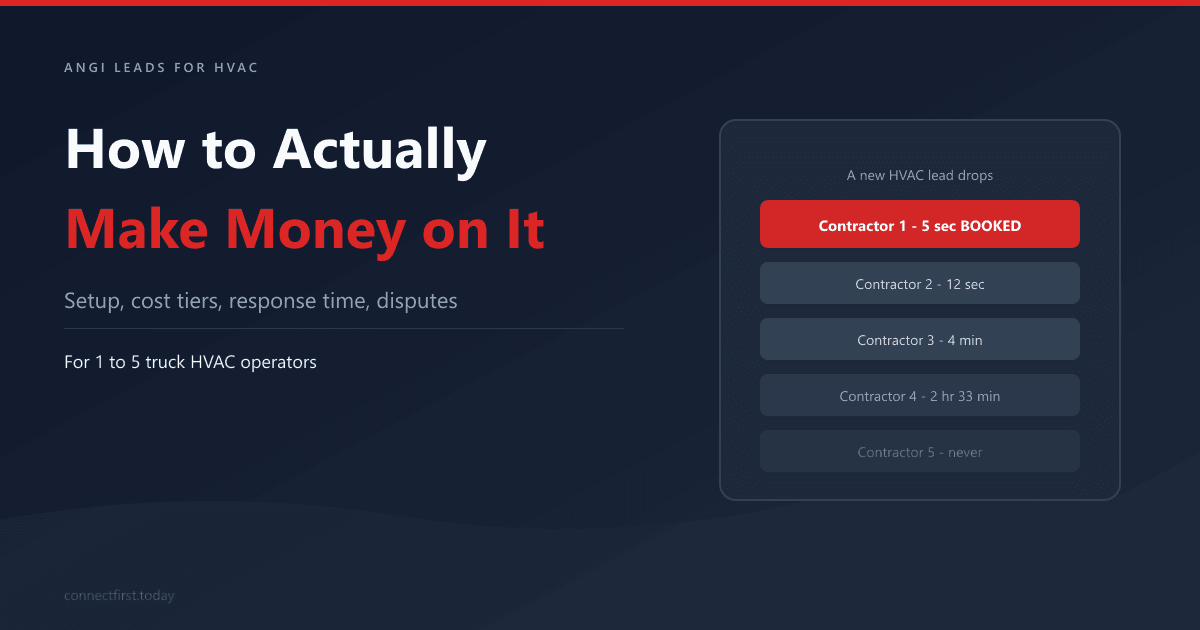
An Angi lead pings a 2-truck shop's phone at 2:14 PM. The owner is under a furnace, hands black, phone in the truck. He sees the notification at 4:47 and calls back. The homeowner already booked the contractor who answered at 2:15.
That happens every day on this platform. Angi sends the same lead to four or five contractors at the same instant. Whoever answers first usually books the job. Everyone else paid for nothing.
This post is the operating manual for not being the 4:47 shop. Everything an owner-operator needs to make money on Angi Leads for HVAC: how to set up the account so the leads are decent, how to price the tiers, how to be the first responder, how to get refunded for the bad ones, and when to pull your spend and put it somewhere else.
Quick Summary
- • HVAC leads on Angi run $25–$120 each, plus $250–$600/month for membership. The math only works if you book at least 1 in 10.
- • 78% of jobs go to the first contractor who responds. The 5-minute window decides everything.
- • Lead filters and ZIP targeting are the highest-leverage settings on the platform. Most operators leave them at default.
- • Angi will refund leads for wrong service area, wrong job type, fake numbers, or unreachable callers. File the credit request.
- • Pull spend when your booked-cost-per-job exceeds your average ticket margin.
In This Post
- 1. How Angi prices HVAC leads
- 2. Real cost per lead by HVAC job type
- 3. Profile and account setup that moves the needle
- 4. Lead filters: the highest-leverage setting nobody touches
- 5. Three monthly budget tiers: $300, $1,000, and $2k+
- 6. Shared leads and the 5-minute response window
- 7. The dispute process: how to get refunded for bad leads
- 8. The Day 0 / Day 2 / Day 7 follow-up sequence
- 9. When to pull spend and switch channels
How Angi Prices HVAC Leads
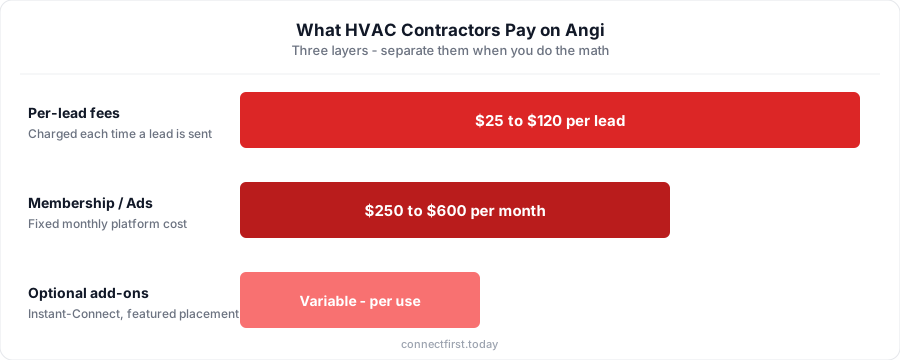
Angi Leads for HVAC has two layers of cost, and most operators bundle them in their head. Separate them.
Per-lead fees. Every time Angi sends you a lead, you get charged. For HVAC, lead fees range from $25 to $120 per lead, depending on the job type, the urgency, and the metro. A "thinking about a tune-up" lead in a small market runs cheap. An "AC out, need someone today" lead in Chicago or Houston runs at the top of the range.
Membership and Angi Ads spend. On top of the per-lead fees, you're paying $250–$600 a month for platform access. Sometimes higher if you've been upsold into Angi Ads or featured placement. This is a fixed cost whether you book any jobs or not.
Optional add-ons. Instant-Connect calls (Angi forwards the homeowner directly to your phone the moment they submit) cost extra per connection. Some markets push featured-pro upgrades, exclusive lead products, or expanded-area buys. Treat these as separate experiments, not defaults.
When an operator tells me "Angi costs me about $80 a lead," I ask if that includes the membership. Half the time the answer is no. Once you add it back, the real cost per lead is $110–$140. That's the number that matters.
Real Cost Per Lead by HVAC Job Type
The per-lead price is meaningless without the ticket attached to it. A $65 lead on a $150 tune-up call is a different math problem than a $65 lead on a $7,000 install. Run the numbers by job type.
| Job type | Typical lead cost | Typical ticket | Break-even close rate |
|---|---|---|---|
| Tune-up / maintenance | $25–$45 | $150–$300 | ~20% |
| Service call / repair | $45–$75 | $300–$1,200 | ~12% |
| Replacement / install | $60–$120 | $5,000–$12,000 | ~3% |
The math gets ugly fast on tune-ups. At a $35 lead and a $200 ticket, you need to close 1 in 5 just to break even on the lead fee, before you've paid the tech, the truck, or yourself. Most shops don't.
Repair and replacement work is where Angi pulls its weight. Our average HVAC job sits around $3,200, and at that ticket a $65 lead with a 12% close rate is a real margin. Install leads at $100 are the best math on the platform if your sales process can land 3 in every 100.
For cross-channel context, organic SEO leads run $10–$30 once rankings are established, and Google Local Services Ads run $25–$75. Both take six months or more to spin up. Angi's job is to bridge that gap. If you want to run this math against your own ticket and close rate, the missed-call calculator does the same arithmetic in a different shape.
Profile and Account Setup That Moves the Needle
The setup most operators rush through and then blame Angi for. Spend 30 minutes on this once and it pays you back every month.
Photos. Ten or more real job-site photos beat any stock image. Before-and-after install shots convert best: old unit out, new unit in, clean install. A homeowner deciding between five contractors picks the one whose photos make the install look like a craftsman did it.
Service-area ZIPs. Over-target and you'll get leads from neighborhoods you can't profitably serve, which spikes your dispute rate and burns time. Under-target and you starve for volume. Pick a tight radius around your dispatch hub, the ZIPs you'd actually drive to without grumbling.
Badges. Background-check, license verification, and insurance verification are three checkbox badges that meaningfully lift contact rate. Background-check costs about $30 a year and pays for itself the first month. Get them.
Response-time setting. Angi lets you advertise how fast you respond. Set this to "within 1 hour" only if you can actually hit it. Lying gets you penalized in the algorithm. Angi tracks your real response times. Be honest, then improve the underlying number.
Job-type checkboxes. Turn off everything you don't actually want. If you don't do duct cleaning, uncheck duct cleaning. Every box you leave checked is a lead you're agreeing to pay for.
Bio and company description. Specific beats clever. "Family-owned, 12 years in [your neighborhood], same-day AC service" beats anything cute. Homeowners scanning five profiles want to know who you are, where you work, and what you fix.
The same logic that makes a Google Business Profile work for HVAC applies here: accurate hours, real photos, complete fields, no missing info. Treat both as the same exercise.
Lead Filters: The Highest-Leverage Setting Nobody Touches
This is the single setting most operators don't realize is doing the most damage. Default filters send you everything. Aggressive filters send you only what you can close.
Job type filters. Inside the Angi Pro app, you can opt out of specific job categories. Turn off "free quote / no urgency" requests if you keep paying for tire-kickers. Keep "system not working today." Those convert.
Job size and ticket-range filters. Where Angi exposes them, opt out of $0–$200 service tickets if you have install volume to chase. The opportunity cost of a tech driving to a $150 service call when you could be quoting a $7,000 install is the real expense.
Urgency filters. "Today" and "this week" leads close at three to four times the rate of "planning ahead" leads. If your bandwidth is tight, narrow to urgent-only and let competitors handle the planners.
ZIP-level toggles. This is the underused power move. After 60 days of leads, you'll see patterns. Certain ZIPs produce flaky homeowners, low tickets, or out-of-service-area requests. Disable them individually inside the Angi Pro app. You don't have to take everything inside your default service area.
The principle is short: every box you leave checked is a lead you're agreeing to pay for. Uncheck aggressively and re-enable later if you starve for volume. Almost no shop does this until they've burned through a few thousand dollars in mismatched leads.
Three Monthly Budget Tiers: $300, $1,000, and $2k+
The right Angi spend depends on your truck count, your install mix, and what your other lead sources are doing. Three tiers, three different shops.
| Tier | Monthly spend | Typical lead count | Best fit |
|---|---|---|---|
| 1 | $300–$600 | 6–12 leads | Solo / 1-truck, no other lead source |
| 2 | $800–$1,500 | 18–30 leads | 2–3 trucks, mixed repair + install |
| 3 | $2,000+ | 35+ leads | Install-focused, aggressive growth |
Tier 1: $300–$600 per Month, Fill the Truck
Six to twelve leads in a month, depending on lead mix and metro. Realistic outcome: one or two booked jobs. This tier is for solo operators or 1-truck shops with a few open slots a week and no other inbound source. Filter for repair and emergency only. You don't have enough at-bats to chase installs at this volume. Skip Angi Ads upgrades. Run the basic Pro plan and dispute every bad lead.
Tier 2: $800–$1,500 per Month, Mixed Volume
Eighteen to thirty leads. The bulk of Angi's value lives here for 2–3 truck shops. Mix repair and install, tighten ZIP targeting, and use the dispute process religiously. At this volume, getting 10% of leads credited back is real money. Track cost-per-booked-job weekly, not monthly. If it stays under 8% of your average ticket, keep going. If it climbs past 12%, something's wrong with your filters or your follow-up.
Tier 3: $2,000+ per Month, Install-Focused
Thirty-five-plus leads. Only worth it if your install close rate is north of 15% and your average install ticket is north of $7,500. Below that, the per-booked-job cost gets ugly fast. At this spend level, you should also be running Google Ads or building organic on a $500/month base. Angi alone at this volume has a ceiling.
Shared Leads and the 5-Minute Response Window
Here's the operational chokepoint. Every Angi lead drops into four or five contractors' inboxes at the same instant. Whoever answers first usually books the job. Everyone else paid for the lead and got nothing.
The data on this is consistent across home services. 78% of jobs go to the first contractor who responds. Contractors who reach a lead within 5 minutes are 100x more likely to connect than those who wait 30 minutes. Those numbers don't bend for HVAC. If anything, they get more brutal. Homeowners with no AC at 95°F book whoever picks up.
A short note on the platform's history: in 2023 the FTC ordered HomeAdvisor (Angi's parent on this product) to pay up to $7.2 million for misrepresenting lead quality and service-area matching. Useful background. But your job today is to win the leads you're paying for, not to litigate the platform.
Honest math for a 1-truck or 2-truck owner-operator: you're under a unit, hands dirty, phone in your truck. By the time you check it, the homeowner is on a call with the shop that answered at 2:15. That's why HVAC shops miss so many calls. Not because anyone's lazy, but because the work and the phone are physically incompatible.
The fix is automation. Every missed call gets a text back inside 30 seconds with a real message: name, shop, an actual offer. Something like "Hi [name], this is Mike at Eastside HVAC. I'm with a customer right now. Can I schedule you for today or tomorrow?" That's the message that wins shared leads when you're under a unit.
If you're going to pay for Angi leads
The only thing that decides whether you book the job is response time. ConnectFirst handles this in 20 minutes of setup. Every missed call gets a personalized text back in under 30 seconds, every time. $99/month flat.
See how it worksThe Dispute Process: How to Get Refunded for Bad Leads
This is the section nobody else writes. Angi will credit you back for leads that meet specific criteria. Most operators don't know the process exists, or they've tried it once, gotten denied, and given up.
Eligible reasons:
- Lead is outside your service area (a ZIP you didn't opt into)
- Wrong job type, like getting "duct cleaning" when you only do AC repair
- Phone number is fake, disconnected, or wrong
- Homeowner is unreachable after good-faith outreach (Angi's standard is typically two documented attempts)
- Spam or duplicate submissions
The time window. Usually 14–30 days from lead delivery. Check the limit inside the current Angi Pro app, since it changes. Don't sit on disputes.
How to file. Inside the Angi Pro app, open the lead detail, tap "request credit," select the reason, add notes. The notes matter, so be specific. "Called twice on 5/2 at 2:14 PM and 5/3 at 9:30 AM. Left voicemails. Sent text. No response." Documentation wins these.
What to keep. A simple log of timestamped call attempts, screenshots of any error messages, and any text or email outreach. Most shops don't track this and lose disputes they should win. Five minutes of admin per disputed lead.
Realistic credit-back rate. If you're disputing honestly, expect 5–15% of your leads to get credited back. Higher than that and you'll get flagged. Lower than that and you're leaving money on the floor. Almost every shop has at least one fake number a month and one obvious wrong-area lead.
Build the habit: 5 minutes every Friday afternoon, review the week's leads, file every dispute that has a leg to stand on. Over a year on Tier 2 spend, that's $1,200–$2,400 back in your account.
The Day 0 / Day 2 / Day 7 Follow-Up Sequence
Most contractors call an Angi lead once, leave a voicemail, and write the lead off if there's no callback. The booked jobs you're missing live in the second and third touchpoints.
Day 0, within 5 minutes. Text and call at the same time. Text first. Homeowners answer texts faster than they answer unknown numbers. Use a real-name template, not something robotic.
Hi [name], this is Mike at Eastside HVAC. Got your request through Angi. I have an opening today at 1 PM or tomorrow at 9 AM. Want me to grab one for you?
If they don't pick up the call, leave a 15-second voicemail referencing the text.
Day 2, about 48 hours later. One follow-up text. Reference the original request. Offer a specific time window, not "let me know when works." A specific offer gets a yes or no. An open question gets ignored.
Quick follow-up on your AC request. I have a slot Wednesday at 10 AM if it's still on your list. Just reply YES and I'll lock it in.
Day 7, soft re-engagement. One final text. Low pressure.
Just checking back. Still need help with the AC? If you've already booked someone, no worries. If not, we're still around.
After Day 7, drop the lead. Anything past that is wasted effort and you're better off prospecting fresh leads. The same sequence works for any inbound; we wrote a longer version of this for website lead follow-up.
When to Pull Spend (and Where to Put It Instead)
Angi isn't right for every shop, and writing the kill criteria is the most useful thing this post can do.
1 truck, no other inbound. Stay in if your booked-cost-per-job is below 10% of your average ticket. Below that line, Angi is keeping the truck full. Above it, something's wrong with the filters or the follow-up. Fix that before pulling spend.
2–3 trucks with some inbound. Cap monthly Angi spend at the lower of $1,500/month or 30% of your marketing budget. Treat it as fill, not your primary channel. Reinvest the difference in Google Business Profile and organic local SEO, the channels that compound.
4+ trucks booked solid. Pull Angi spend. At this point you're paying retail for leads you'd be getting cheaper through Google Local Services Ads, your GBP, or Nextdoor neighborhood sponsorship. The shops that grow past 4 trucks almost always graduate off Angi.
The cross-channel reality: Angi's cost per booked job tends to run 4–5x higher than SEO and PPC over a 12-month window. The reason it still gets used is that SEO and PPC take six months or more to ramp. Angi's job is to bridge the gap while you build the channels that compound. It's not the destination.
Key Takeaways
- Angi prices HVAC leads at $25–$120 per lead plus $250–$600/month membership. Separate the two when you do the math.
- Cost only makes sense by job type. Installs and emergency service work, tune-ups rarely do.
- Filters and ZIP targeting are the highest-leverage settings on the platform. Uncheck aggressively.
- Speed to lead is the whole game. 78% of jobs go to the first responder, and 5 minutes is the cutoff.
- Dispute every bad lead that meets the criteria. A 5–15% credit-back rate is normal and expected.
- Pull spend when your booked-cost-per-job exceeds 10% of your average ticket margin, and reinvest in channels that compound.

ConnectFirst
Missed-call text-back built for 1–5 truck HVAC shops. connectfirst.today