A homeowner in Portage Park posts on Nextdoor asking for an HVAC recommendation. Three shops show up. One has 12 reviews, a verified business page, and a sponsored ad that reads "HVAC service in Portage Park. Same-day AC repairs. Message us." The other two have nothing. She messages the first shop.
That's Nextdoor ads for HVAC in one scenario. If your shop isn't the one showing up, this post explains how to fix that: at $100 a month, $500 a month, or $2,000 a month, depending on where you are and what you're trying to do.
Quick Summary
- • 77% of Nextdoor users are homeowners, one of the best local audiences for HVAC
- • Get your free page and 5+ recommendations before spending a dollar on ads
- • At $100/month: one format ("Get more messages"), one zip, one goal
- • At $500/month: split between direct inquiry and a seasonal image ad across 2–3 zips
- • At $2k/month: add Neighborhood Sponsorships to hold your category in core zips
In This Post
- 1. Why Nextdoor ads work for HVAC companies (and when they don't)
- 2. The three ad formats that matter
- 3. Before you spend: the free page prerequisite
- 4. $100/month: one zip, one format, one goal
- 5. $500/month: add image ads, expand your footprint
- 6. $2,000/month: full mix, full market coverage
- 7. Creative that converts: what to write and show
- 8. The one thing most shops miss after a Nextdoor lead
Why Nextdoor Ads Work for HVAC Companies (And When They Don't)
Nextdoor isn't a search engine. Nobody opens the app and types "AC repair near me." They scroll their neighborhood feed, read their neighbors' recommendations, and occasionally see a sponsored post from a local business.
That's a different intent stage than Google. Someone clicking a Google Ads result is ready to call right now. Someone who sees your Nextdoor ad is a homeowner in your service area who might need HVAC service this season. You're planting a flag, not capturing a hand-raised lead.
That distinction matters for how you measure it. Nextdoor reports that 77% of its users are homeowners and 79% say a recommendation on the platform influenced them to hire a service. Those numbers are real, but they describe a trust-building environment, not a high-intent search environment. Nextdoor advertising for HVAC companies sits in a different lane than Google: cheaper clicks, lower immediate intent, higher neighborhood trust.
For cost: Google Ads for HVAC run $45–$104 per lead. Nextdoor CPC runs $2–$5. The clicks are cheaper but they don't carry the same purchase intent. We've covered the Google Ads vs. organic tradeoff for HVAC shops here. Nextdoor is a third option, not a replacement for either.
Where it earns its place is neighborhood trust. A homeowner who sees your ad and then sees their neighbor's recommendation of your shop: that combination converts better than a cold Google click. The ad is the reminder. The recommendation is the proof.
The Three Ad Formats That Matter for HVAC
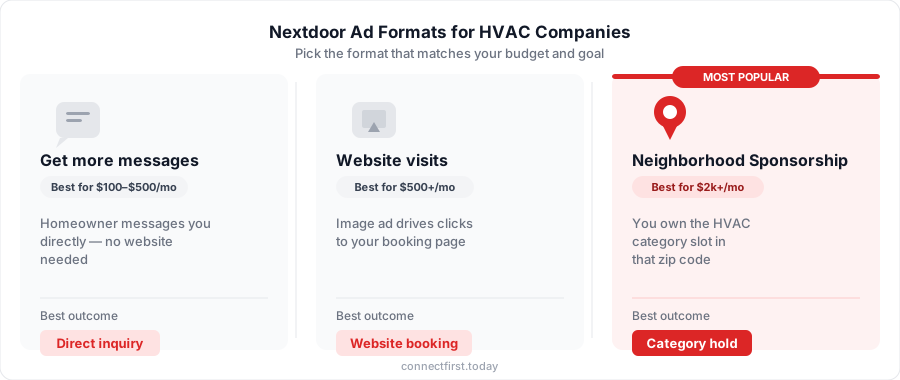
Nextdoor's small business ad system is built around three goals. Each one produces a different outcome for your shop. (You may have heard of Nextdoor Local Deals or Nextdoor sponsored posts for HVAC. Those are the legacy names. The current platform replaced them with three goal-based formats: messages, website visits, and Neighborhood Sponsorship.)
Get More Messages: Direct Inquiry, No Website Needed
The homeowner sees your ad and taps a button to message you directly inside Nextdoor. No landing page, no form, no redirect. They type "Do you service Portage Park? How much for a furnace tune-up?" and wait.
This is the right format for most HVAC shops getting started on Nextdoor. You don't need a polished website or a booking page. You do need someone to respond fast. A message that sits for four hours is a dead lead.
Increase Website Visits: Drive Traffic to a Booking Page
A standard image ad: headline, photo, call-to-action, link. The homeowner clicks and lands on your website or a specific offer page.
This format works when you have a clear destination: a seasonal tune-up special, a booking page, or a Google Business Profile with a "Book Online" button. Without that, you're paying for clicks that go nowhere.
Neighborhood Sponsorship: Own the HVAC Category in Your Zip
This is a separate product from the standard ads. You pay a fixed monthly fee to sponsor the "HVAC" category in a specific zip code. Your business appears as the featured HVAC provider in that zip's recommendations, news feed, and email digest, ahead of competitors who haven't claimed the slot.
Neighborhood Sponsorships run $32–$150/month per zip depending on market competition. Chicago zips tend toward the higher end. The slots are limited. If a competitor holds the HVAC category in 60630, you can't claim it until they drop it.
This format is the right move at $2k/month, not $100/month. More on that below.
Before You Spend: Set Up Your Free Page First
I've seen shops spend $300 on Nextdoor ads on a page with two reviews and wonder why nothing happened. The ads worked. People clicked. The page didn't convert because there was nothing there to trust.
Nextdoor is a recommendation-first platform. Ads amplify trust that already exists. They don't create it.
Before you run a single paid campaign:
- Claim and verify your Business Page at business.nextdoor.com. Takes about 20 minutes. Verify by phone, text, or business document.
- Get at least 5 recommendations. Ask recent customers directly. Text them a link. Most will do it if you ask. Five is the floor; 10+ is where ads start converting reliably.
- Post twice a month. Nextdoor lets businesses post for free twice monthly. Use it: seasonal tips, a before/after job photo, a direct callout to a neighborhood ("Now servicing Portage Park through summer. DMs open").
If you've set up your Google Business Profile, you already know this sequence: claim the free page, build reviews, then pay for visibility. Nextdoor works the same way. For help deciding which Chicago neighborhoods to focus on first, this post maps HVAC demand by zip.
Pro Tip
Nextdoor's "Neighborhood Favorites" award goes to businesses with 30x more recommendations than average. You don't need to win it, but 5 recommendations is the honest floor before ads are worth running.
$100/Month: One Zip, One Format, One Goal
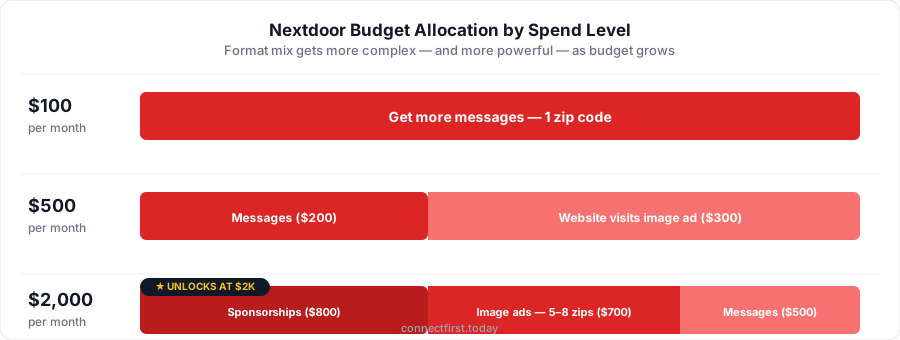
At $100/month (roughly $3.20/day), you can't cover your whole service area. Trying to spread that across multiple formats or zips produces nothing useful. You won't get enough data to know what's working, and you won't get enough volume to see results.
The right move at this budget: deliberate constraint.
Where to put it: 100% on "Get more messages" in your single highest-density service zip. For a northwest-side Chicago shop, that's probably 60630 (Portage Park), which has roughly 45,000 households, heavy bungalow stock with aging HVAC systems, and high homeowner concentration.
What to expect: At $2–$5 CPC, About 20–50 clicks per month at the $100 spend level (Taradel). That's not a flood. But if you get 3–5 direct inquiries in 30 days, Nextdoor is working in that market. Your cost per inquiry at this tier will run roughly $20–$35 depending on your market. That's the tradeoff for low volume: usable data on whether the channel works, not a finished lead machine. If you get zero, something is wrong, usually the page (no reviews) or the ad copy (too generic).
Your ad at this budget: Keep it specific. "HVAC service in Portage Park. AC tune-ups, emergency repairs, no-trip-fee quotes. Message us." Set the questions homeowners will see when they tap: "What service do you need?", "When do you need it?", "What's your address?" Simple, direct, useful.
The goal at $100/month is data, not profit. You're finding out whether Nextdoor users in that zip engage with your shop. Once you know they do, you scale.
What not to do: Don't run "Increase website visits" at this budget. Your landing page conversion rate will muddy the results. Don't target three zips. Too spread out to learn anything. Don't set it and forget it for three months without checking the message response rate.
$500/Month: Add Image Ads, Expand Your Footprint
At $500/month (~$16/day), you have enough to run two formats across a real service area. This is where Nextdoor starts functioning as a feedback loop rather than a single experiment.
Budget split:
- ~$200/month → "Get more messages" in your anchor zip (the one you tested at $100, so you know it converts)
- ~$300/month → "Increase website visits" image ad across 2–3 adjacent zips with a seasonal offer
What this looks like for a northwest-side Chicago shop:
- Anchor zip: 60630 (Portage Park): "Get more messages" stays always-on
- Expansion zips: 60639 (Belmont Cragin) + 60634 (Dunning): image ad promoting a seasonal special ("AC tune-up, $89 through June. Book online.")
- The image ad drives to a booking page or your Google Business Profile
What to measure at this level:
- Which zip is generating clicks vs. inquiries?
- Is the image ad converting after people hit your site?
- What's your cost per inquiry across both formats?
The seasonal angle matters here. At $500/month, you can time your image ad spend around peak demand: ramp it up in May for AC season, pull back in October, pivot to a furnace tune-up offer in November. "Get more messages" runs year-round.
Pro Tip
If your "Increase website visits" ad is getting clicks but no calls, the problem is usually the landing page, not the ad. Check that your phone number is above the fold, the page loads fast on mobile, and there's a specific offer, not a generic contact form.
$2,000/Month: Full Mix, Full Market Coverage
At $2,000/month, the goal shifts from testing to owning. You're running three formats simultaneously, holding the HVAC category in your core zips, and maintaining consistent presence across a full service area.
Budget split:
- ~$800/month → Neighborhood Sponsorships in 2–3 core zips
- ~$700/month → "Increase website visits" image ads across 5–8 zips (seasonal creative rotated monthly)
- ~$500/month → "Get more messages" always-on across 2–3 zips
Neighborhood Sponsorships at this budget level:
For a northwest-side Chicago shop, that might mean sponsoring 60630, 60634, and 60639, your three highest-density residential zips. At $32–$150/zip/month, you're looking at $96–$450/month on sponsorships alone, which is why this format only makes sense at the $2k tier.
What you get: your business appears as the featured HVAC provider in those neighborhoods' recommendations, news feeds, and digest emails. Competitors can still run standard ads in those zips, but they can't hold the category slot you're occupying. It's a category lock, not a guarantee of leads, but a persistent presence that compounds over time as neighbors see your name repeatedly before they need HVAC service.
Expected outcomes at $2k/month (rough planning estimates, not guarantees):
- Neighborhood Sponsorships: sustained brand recognition in 2–3 zips; hard to attribute directly, but homeowners start recognizing your name before the emergency call
- Image ads: 5–8 zip coverage at ~$20 CPM → 35,000+ impressions/month; at 0.5% CTR → ~175 website visits/month
- "Get more messages": 100–250 clicks/month → 20–50 direct inquiries/month depending on zip competition
At this spend level, every lead you generate has a real dollar value, and every one you miss costs you. Run the numbers on what missed calls are costing your shop with our missed-call cost calculator before you scale up. If you're missing 20% of your inbound calls, the ROI math on a $2k Nextdoor budget changes fast.
The honest tradeoff: Neighborhood Sponsorships are a fixed cost whether or not leads come in. They work when your reviews are solid (10+), your response time is fast, and your service area justifies the coverage. If you're still sitting at two reviews and a slow callback time, drop back to $500/month and fix the fundamentals first.
Creative That Converts: What to Write and Show
The Nextdoor ad body field holds 1,700 characters, but only about 90 show before "read more." Write for the 90 characters. Put the most useful thing first.
"AC tune-ups for Portage Park homeowners, $89 through June. Book same-day." That's 71 characters. It tells them who it's for, what it costs, when the offer ends, and what to do. A paragraph about your company history that gets cut off at "We are a family-owned HVAC comp…" does none of that.
Four things the data supports:
Localize the headline. Reference the neighborhood by name. "Serving Portage Park since 2008" or "Dunning's HVAC shop: call or message." CTR increases 15% when the ad copy feels local rather than generic.
Keep image text minimal. Under a quarter of the image should contain text. CTR is 10% higher when images aren't cluttered. A clean van photo, a finished install shot, or a Chicago bungalow exterior works better than a text-heavy promotional graphic.
Use "Book Now" or "Get a Quote." Not "Learn More." The homeowner already knows they need HVAC service. "Learn More" is the right CTA when you're trying to educate. It's the wrong one when you're trying to get a call.
Rotate with the season. An "AC tune-up before summer" ad in April outperforms a generic year-round ad. Match the creative to what's actually happening in your market.
Stop Losing Nextdoor Leads to Voicemail
You've built your Nextdoor page, gotten your reviews, and started running ads. A homeowner in Belmont Cragin sees your sponsored post, decides you look legit, and calls. You're in a crawl space under a house in Dunning. It goes to voicemail.
She calls the next shop on the list.
That's not a Nextdoor problem. That's a response time problem. Research consistently shows that most customers go with whoever responds first, and it happens constantly during busy season when you're generating more leads than you can personally answer. Automatic text-back is how shops close the gap. ConnectFirst texts the missed caller back within 30 seconds from your business line, keeping the lead warm until you can call back.
Key Takeaways
- Nextdoor's 77% homeowner audience makes it one of the best local platforms for HVAC, but it builds trust rather than capturing active search demand the way Google does.
- Set up your free business page and get at least 5 recommendations before running paid ads. The ads amplify what's already there; they don't build trust from scratch.
- At $100/month: put everything into "Get more messages" in your single best zip. Treat this month as a baseline test, not a lead machine.
- At $500/month: split between "Get more messages" in your anchor zip and a seasonal image ad across 2–3 adjacent zips. Start measuring cost per inquiry by format.
- At $2k/month: add Neighborhood Sponsorships to hold the HVAC category in your core zips, expand image ads across your full service area, and keep "Get more messages" always-on. Run the missed-call math before you scale; every inquiry you miss at this budget level has a real cost.
- Write ad copy for the 90-character window. Localize the headline. Keep image text minimal. Use "Book Now" or "Get a Quote."
- Nextdoor leads come in warm. Lose one to voicemail and it's gone.
Written by ConnectFirst
ConnectFirst helps small HVAC shops stop losing jobs to missed calls. When a call goes unanswered, ConnectFirst texts the caller back within 30 seconds, so the lead stays warm while you finish the job you're already on.